
Slow Wi-Fi at the worst possible moment? Before you blame your ISP, run a quick speed test. A good test tells you exactly what's happening on your connection — download speed, upload speed, ping, and jitter — in about 15 seconds. No apps, no signup, no excuses, and no need to guess whether the problem is your router, your ISP, or something else entirely.
How a Speed Test Actually Measures Your Connection
A speed test works by transferring real data — usually a series of increasingly large chunks — between your device and a nearby server, then dividing the amount of data moved by the time it took. Download speed sends data toward you and measures how fast it arrives; upload speed does the reverse. Ping is measured separately, by sending a tiny signal to the server and timing how long the round trip takes, independent of how much data is actually transferred. Because the whole process only runs for a matter of seconds, a test is really a short, representative sample of your connection's current state — not a permanent, unchanging number, which is exactly why running it more than once can be worth doing.
What Is an Internet Speed Test?
An internet speed test measures how fast your connection can move data between your device and the internet. A good test reports four numbers, and each one means something different:
- Download speed — how fast data comes to your device, measured in Mbps. Affects streaming, browsing, and downloads.
- Upload speed — how fast data leaves your device. Matters for video calls, cloud backups, and posting media.
- Ping (latency) — how long a single round trip takes, in milliseconds. Low ping = snappy, responsive connection.
- Jitter — how much your ping varies over time. High jitter causes choppy video calls and rubber-banding in games.
Why Your Internet Speed Matters
Different activities need different amounts of bandwidth. Here's a quick reference for what you actually need:
| Activity | Recommended Speed |
|---|---|
| HD Streaming (1080p) | 5 Mbps |
| 4K Streaming | 25 Mbps |
| Video Calls (Zoom, Meet) | 3 Mbps |
| Online Gaming | 10 Mbps |
| Working From Home | 25+ Mbps |
If your test results are well below the activity you're trying to do, that's your bottleneck right there — and it's worth checking against the table above rather than guessing at what "slow" actually means for what you're trying to do.
Why Your Result Doesn't Match Your Plan's Advertised Speed
A "100 Mbps" plan is almost always marketed as an "up to" figure — a best-case ceiling under ideal conditions, not a guarantee you'll see on every test. Several things eat into that number before it reaches your test result: Wi-Fi itself has real protocol overhead that reduces effective throughput below the rated speed of the wireless standard you're using, other devices on the same network (a phone backing up photos, a smart TV streaming in another room) share the same pipe and can measurably cut into your result, and network congestion during peak evening hours can slow things down on the ISP's end even when your own setup is fine. A result noticeably below your plan's number doesn't automatically mean something is broken — it's worth running the test again, ideally over a wired connection, before assuming there's a real problem.
How to Test Your Speed with Skycally
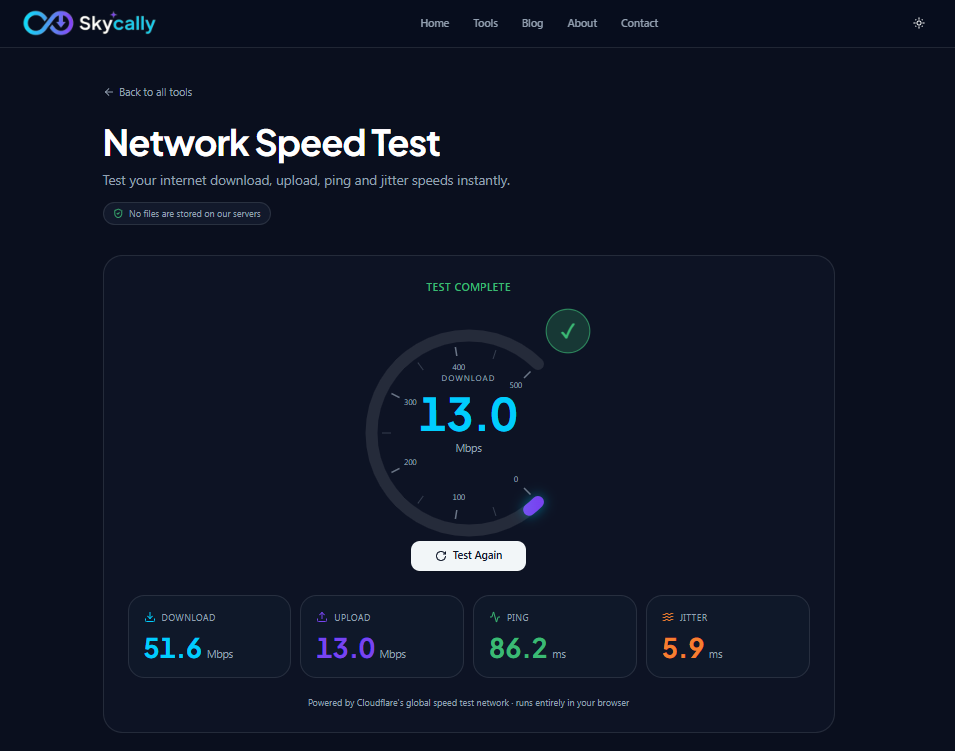
Skycally's speed test runs entirely in your browser using Cloudflare's global network. No download, no install, no account — just a page that loads instantly and a single button to press.
- Open Skycally Network Speed Test
- Click Run Test
- Wait about 15 seconds while we measure download, upload, ping, and jitter
- Read your results — each metric is shown in its own card with a clear value
Understanding Your Results
Knowing the numbers is only half the battle — here's what counts as good or bad for each one:
Download Speed
100+ Mbps is great for most households, even with multiple 4K streams running at once. 25–100 Mbps is solid for everyday use. Below 10 Mbps will struggle with HD streaming and large downloads.
Upload Speed
10+ Mbps is plenty for video calls, screen sharing, and cloud sync. Below 3 Mbps means your camera will look pixelated in meetings and uploads will drag.
Ping
Under 30 ms is excellent — gaming and video calls will feel instant. 30–100 ms is fine for most uses. Above 150 ms noticeably impacts real-time apps.
Jitter
Under 10 ms is great. 10–30 ms is acceptable. Above 30 ms means a shaky connection — expect dropped audio in calls and lag spikes in games.
Tips to Improve Your Internet Speed
If your numbers look weak, try these in order — most issues clear up before you ever need to call your ISP:
- Restart your router and modem. Unplug both for 30 seconds, then plug them back in. This fixes more problems than you'd think.
- Use 5 GHz Wi-Fi or wired Ethernet. The 2.4 GHz band is slower and crowded; an Ethernet cable beats Wi-Fi every time.
- Move closer to your router. Walls, floors, and distance all kill Wi-Fi signal. Line-of-sight to the router makes a huge difference.
- Close bandwidth-heavy apps. Background uploads, cloud syncs, and other devices streaming 4K will eat your bandwidth.
- Upgrade your plan or contact your ISP. If you consistently measure far below the speeds you're paying for, it's time to call.
The Mix-Up That Confuses Almost Everyone: Mbps vs. MB/s
Speed tests report results in megabits per second (Mbps), but file sizes and download managers usually show megabytes (MB) — and a byte is 8 bits, so these are not the same unit. A "100 Mbps" connection moves roughly 12.5 megabytes per second, not 100. A 1 GB file at 100 Mbps takes a little over a minute and a half to download, not ten seconds — a common source of "why is this taking so long when I have fast internet" confusion. When comparing a speed test result to how long a download will realistically take, divide the Mbps number by 8 to get a rough megabytes-per-second estimate first.
Why Use Skycally's Speed Test?
- No signup, no apps — just open the page and click Run Test
- Runs entirely in your browser — nothing to install, no tracking
- Powered by Cloudflare's global network for accurate results from a server near you
- Measures ping and jitter, not just download speed — so you get the full picture
- 100% free, with no ads in the test
Frequently Asked Questions
Why do I get a different result every time I run the test?
Some variation is completely normal — network congestion, other devices on your network, and even which test server you connect to can shift results slightly from one run to the next. Run it two or three times and look at the typical range rather than treating any single result as the definitive number.
Should I test over Wi-Fi or a wired connection?
Both are useful for different reasons. A wired test tells you the actual speed your ISP is delivering to your home; a Wi-Fi test tells you what you're actually getting on the device you use day to day. If the two differ significantly, the gap is coming from your Wi-Fi setup, not your internet plan.
Does running a speed test use a lot of data?
A single test typically uses somewhere in the range of a few hundred megabytes, similar to streaming a few minutes of HD video. It's not something to worry about unless you're on a very limited data plan and running tests repeatedly.
Why is my upload speed so much lower than my download speed?
Most home internet plans are intentionally asymmetric — cable and DSL connections in particular are built to prioritize download bandwidth, since most household usage (streaming, browsing) is download-heavy. This is a normal characteristic of the plan itself, not a sign of a problem, unless your upload speed is far below what your plan actually promises.
Is Skycally's test as accurate as other well-known speed test sites?
Yes — it measures the same underlying metrics (download, upload, ping, jitter) using the same general approach: real data transfer to a nearby server, timed precisely. Results across different reputable test tools should land in a similar range for the same connection at the same moment.
Does the speed test track or store my results?
No. The test runs entirely in your browser and the results are shown to you directly — nothing is logged or tied to your identity.